



A practical guide to connecting Intuitive® ERP to Power BI with PeopleSense. What it looks like, what you get, and how to get started.
Running a business means that every day contains a series of small course corrections: an order completed early here, a supplier late there. Nothing ever goes precisely to plan, but if you know what’s coming, you can adjust.
Problems start when you don’t know what’s coming.
If your executive team is stuck building manual reports just to see what’s happening… well, let’s just say you’ll end up with some last-minute scrambles.
It’s no secret that one of the best ways to gain clear, actionable insight is to connect Intuitive® ERP to Power BI. But it’s a complicated process. Many manufacturers and distributors partner with us to design and implement this integration because it allows them to act on insights rather than focus on plumbing.
Why Native Intuitive® Reports Fall Short
Native Intuitive® reports exist, but they’re better for looking up specific transaction or operational records. They’re not as effective for trend analysis or cross-functional business intelligence.
When your CFO needs to spot emerging trends, drill down from annual numbers to a single day, or automatically push late-PO reports to the Purchasing team each morning, Intuitive® ERP’s native tools hit a wall.
That’s where Power BI comes in.
Power BI handles all this and more with ease, but it’s quite difficult to set up initially. It takes a lot of know-how to ensure that each of your Power BI data points map to the precise data you need from your Intuitive® system.
Most companies don’t have the level of Power BI expertise necessary for this setup, which is why the integration from our experts at PeopleSense is so popular.
How the Intuitive® ERP + Power BI Integration Works
To make the implementation process quick and painless for you, the PeopleSense team follows the proven, recommended “star schema” model, which seamlessly connects your Intuitive® data to Power BI. Think of it as a central hub that connects all your data tables, so Power BI can pull from any of them immediately, with full accuracy.
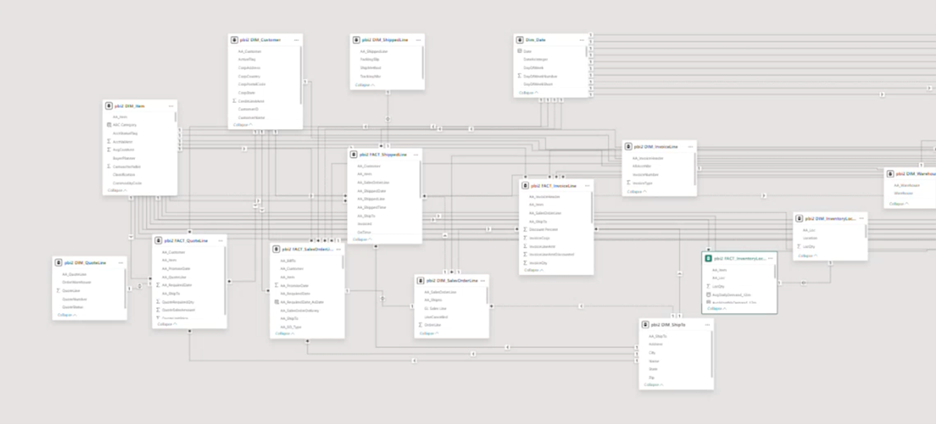
A properly set up star schema is where the real magic happens. Once it’s in place, it can securely push all your Intuitive® data into Power BI on the cloud, including data about your customers, invoices, inventory, work orders, BOMs, shipping data, and POs.
After everything is connected, you and your team can build and modify custom Power BI reports in minutes, which provides your appropriate staff members with full insight into anything they need. Wherever their curiosity leads them, they can create a Power BI visualization to find out more and drive your company forward.
What Power BI Can Show You
When PeopleSense connects Intuitive® ERP to Power BI for you, you get a toolbox of Power BI reports you can build from. We like to think of these like Lego blocks that you can use to design any report or dashboard you can imagine.
We also show you how to customize your reports and filter your data, so that your team is prepared to get the answers they need — fast.
Our pre-built starter reports span across sales, shipping, invoices, work orders, inventory, BOMs, POs, routing, and more.
Here are a few of them to get you thinking:
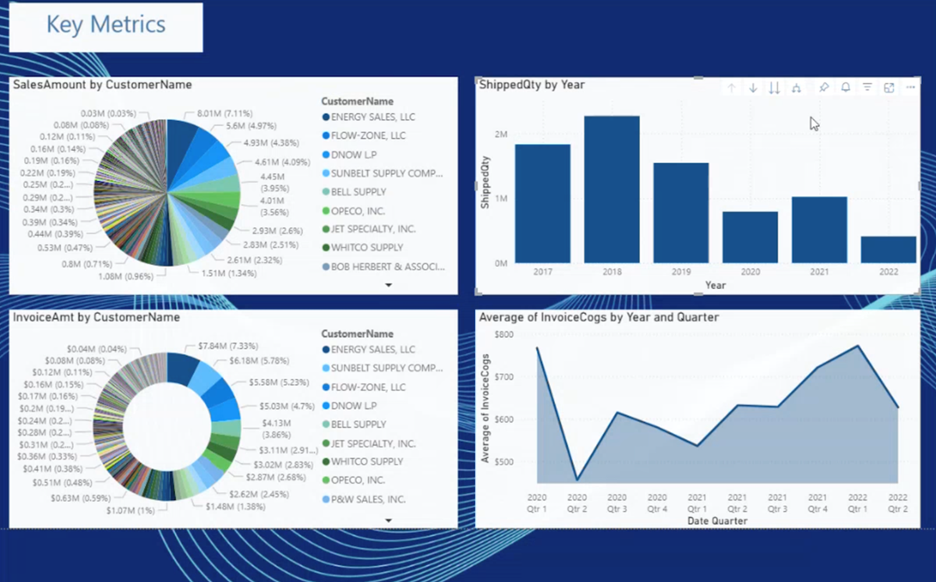
Sales performance drill-down — view by year, quarter, month, or day, and filter by customer, product family, or region.
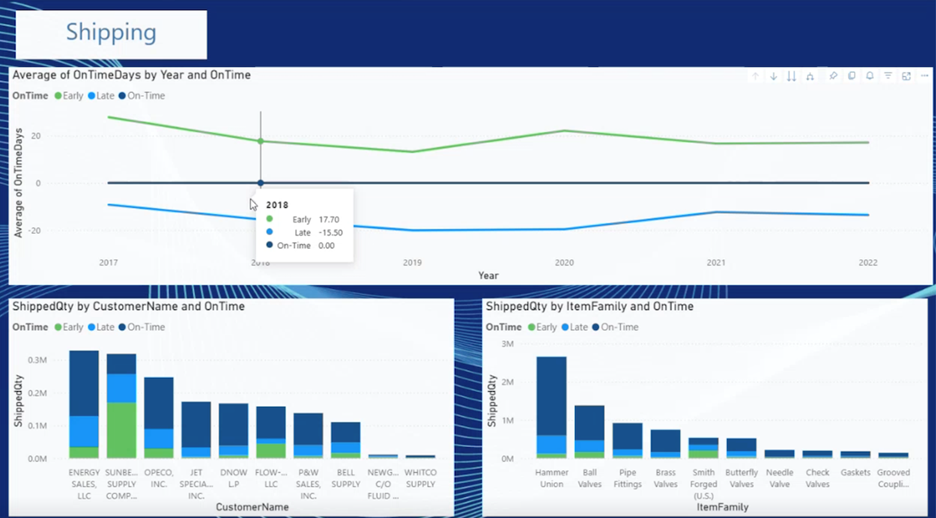
On-time delivery report — see which shipments were early, on time, or late, and drill into the product families or customers behind the delays.
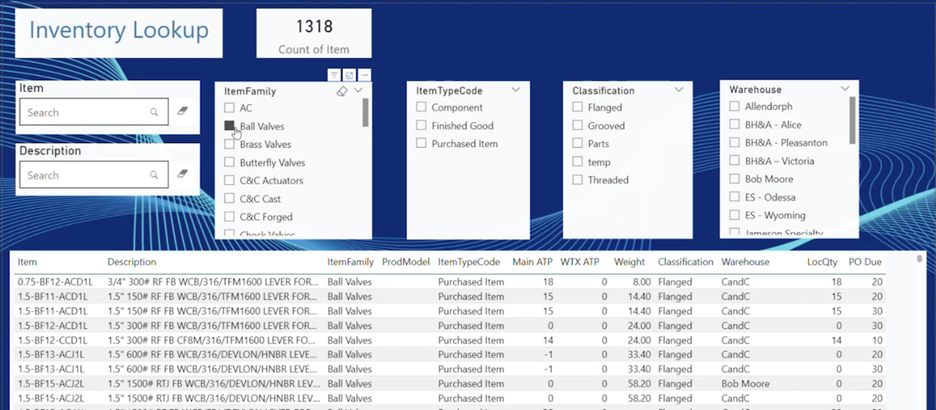
Inventory Lookup tool — this isn’t a traditional analytics tool; it’s more of an inside sales tool, and we’ve found it to be very popular. It helps new salespeople to search and filter through inventory lists to find parts and view availability, so they can deliver better, faster customer service.
In each of your reports, you can drill down from year to quarter to month, and even to day. You can export data to Excel. You can set up what Power BI calls “subscriptions,” where your system auto-emails full or filtered reports to specific people daily or weekly.
The right data, in front of the right people, at the right time… that’s what this integration makes possible.
How to Connect Intuitive® ERP to Power BI: Getting Started
The PeopleSense process includes a modular setup, so you only pay for what you actually need. Many companies stick with our core module, which includes connections for sales, invoicing, and customer data. Some companies add Operations and/or Manufacturing modules as their reporting needs grow.
On the Power BI side, we recommend purchasing a Power BI Pro license for each user who needs to create, view, or subscribe to reports. Those licenses currently cost around $14 per month per user.
After installation, setup typically takes about 3 hours. After that, your team can start using Power BI right away.
If you find you want more data connected from outside your Intuitive® ERP, PeopleSense is happy to help with that, too. Whether you want to add outside budgeting data, labor spreadsheets, or anything else, all you have to do is ask.
See It in Action
The gap between the data you have and the decisions you need to make doesn’t have to be filled with manual exports, workarounds, and educated guesses. When Intuitive® ERP and Power BI are properly connected, your team stops chasing numbers and starts acting on them.
Ready to connect Intuitive® ERP to Power BI the easy way? Check out the on-demand video from our recent user-group session, which covers this in detail.